


An ADA compliant website is rarer than you would think. Almost every site fails. Yours probably does too.
That sounds like bad news. It is actually the start of some good news, because the failures are nearly always the same handful of small things. Most of them can be found in fifteen minutes and fixed once, in your site’s template. Let me explain.
First, an honest word. I am not a lawyer, and nothing on this page is legal advice. I build and fix small business websites, and I have done since 2019. What I can tell you is what the law and the official guidance say, what a website has to do to meet them and how to check yours today. If a letter has already arrived, call a lawyer first and read the rest of this afterwards.
- Department of Justice guidance says the ADA covers the websites of businesses open to the public, but sets no detailed technical standard for them.
- WCAG 2.1 or 2.2 at Level AA is the yardstick courts and settlements use to judge a business website.
- The April 2027 and April 2028 dates apply to state and local governments under Title II, not to private businesses.
- An accessibility widget does not make a site compliant. The FTC fined accessiBe $1 million in 2025 over that claim.
- Six failures cover most problems: low contrast, missing alt text, unlabelled form fields, empty links, empty buttons and missing page language. Most are fixed once, in the template.
What happens when a website isn’t accessible
Picture a bakery with a simple website. A menu, a contact form, a map. The owner has never thought about accessibility. Why would she? Nobody has ever complained.
Then a letter arrives from a law firm. It says a blind customer tried to order a cake using a screen reader, the software that reads a page out loud. The photos had no descriptions. The order form’s fields had no labels, so the software read out “edit text, edit text, edit text”. The customer gave up. The letter says the bakery broke the Americans with Disabilities Act.
That bakery is an illustration. The letter is not. Lawsuits like it are filed in US courts every week.
Now here is the part that should bother you more than the lawsuit. That customer wanted to buy. The site turned her away. She did not call. The letter is one problem; the lost customer is the problem you will never hear about. It is one quiet reason a site gets traffic but no enquiries.
ADA website compliance requirements, in plain words
Does the ADA cover websites?
The ADA does not mention websites. It was signed in 1990. So where does the website rule come from?
It comes from Title III, the part of the ADA that covers businesses open to the public: shops, restaurants, clinics, law firms, hotels. The US Department of Justice published guidance on web accessibility in March 2022. It says the department “has consistently taken the position that the ADA’s requirements apply to all the goods, services, privileges, or activities offered by public accommodations, including those offered on the web.” When I read it on 23 November 2026, it was still published, with no notice of withdrawal.
What standard does a website have to meet?
Here is the catch. The same guidance says the department “does not have a regulation setting out detailed standards” for business websites. There is no official checklist. Instead it points to the Web Content Accessibility Guidelines, known as WCAG, as helpful guidance. WCAG is the international standard written by the W3C. It comes in three levels: A, AA and AAA. Level AA is the one courts, settlements and most experts treat as the working target.
What about the April 2026 deadlines?
You may have read about deadlines in April 2026. Those belong to a different rule under Title II, which covers state and local governments, not private businesses. It adopted WCAG 2.1 Level AA, and in April 2026 the Department of Justice moved its dates back a year, to April 2027 for larger public bodies and April 2028 for smaller ones. If you run a business, that rule does not set a date for you. Title III has applied all along.
None of this is theoretical. According to the ADA Title III blog run by the law firm Seyfarth Shaw, 3,117 website accessibility lawsuits were filed in US federal courts in 2025, up from 2,452 in 2024. That count leaves out state courts and the letters that settle before anyone files.
So the plain answer is this. If your business is open to the public in the US, your website is expected to be usable by people with disabilities. WCAG 2.1 or 2.2 at Level AA is the yardstick everyone uses to judge whether it is.
Does the ADA apply to small business websites?
This is the objection most owners raise. It deserves a straight answer.
Title III has no size cut-off for public accommodations. A one-location bakery and a national chain are covered by the same words. And the size of the audience is not small. The CDC says more than 1 in 4 US adults has some type of disability. Vision, hearing, mobility and memory all show up in that number.
Think about your own customers for a moment. Some of them read your site zoomed in to 200 percent. Some use a keyboard because a mouse hurts. Some listen to it. Each of them is someone who wanted to call you. The question is whether your website lets them.
Do accessibility widgets make a website ADA compliant?
You have seen the ads. Add one line of code, get a little icon in the corner and your site is compliant. It is a tempting promise. I wish it were true. It would save a lot of owners a lot of money.
It is not. In April 2025 the US Federal Trade Commission approved a final order requiring accessiBe, one of the best-known widget makers, to pay $1 million. The FTC said the company’s claims that its tool could make any website WCAG compliant were not backed up. The order bars it from making that claim without evidence.
The reason is simple. A widget sits on top of the page. The problems live inside it. A widget cannot know what your photo of a wedding cake shows, so it cannot write the description. It cannot rebuild a form that was built wrong. Many blind users already have their own screen reader, and an overlay can get in its way.
The six most common accessibility failures
Now the good news I promised. Every year, the non-profit WebAIM tests the home pages of the top one million websites. In February 2026, 95.9% of them had failures its software could detect. That sounds hopeless until you look at what the failures are. The same six have led the list for years:
Notice something about that list. None of it is exotic. Every item is a setting, a colour or a line of text. Most of them sit in the template, so fixing the header fixes it on every page at once.
WCAG asks for more than these six, and passing an automated test does not prove a site is accessible. WebAIM says so itself. But a site that fails these six will fail a real visitor, and that is where every fix should start.
How to check if your website is ADA compliant
You do not need any special skill for this. Open your home page and your contact page, and try these four tests on each. If you would rather start with a report, run my free accessibility checker first. It runs the automated part of these checks for you.
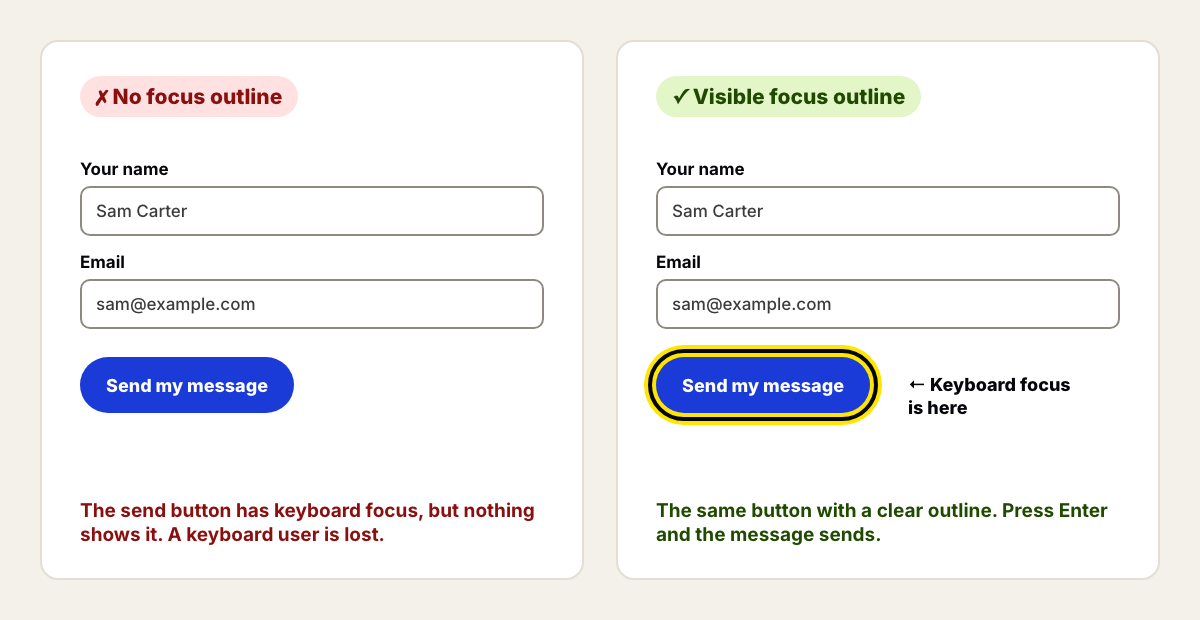
- Put the mouse away. Press the Tab key, again and again. You should see a clear outline jump from link to link, through the menu, into the form and onto the send button. If the outline vanishes, or you get stuck, a keyboard user is stuck too.
- Zoom to 200 percent. Hold Ctrl (Cmd on a Mac) and press + until the browser says 200%. Nothing should overlap, vanish or need sideways scrolling.
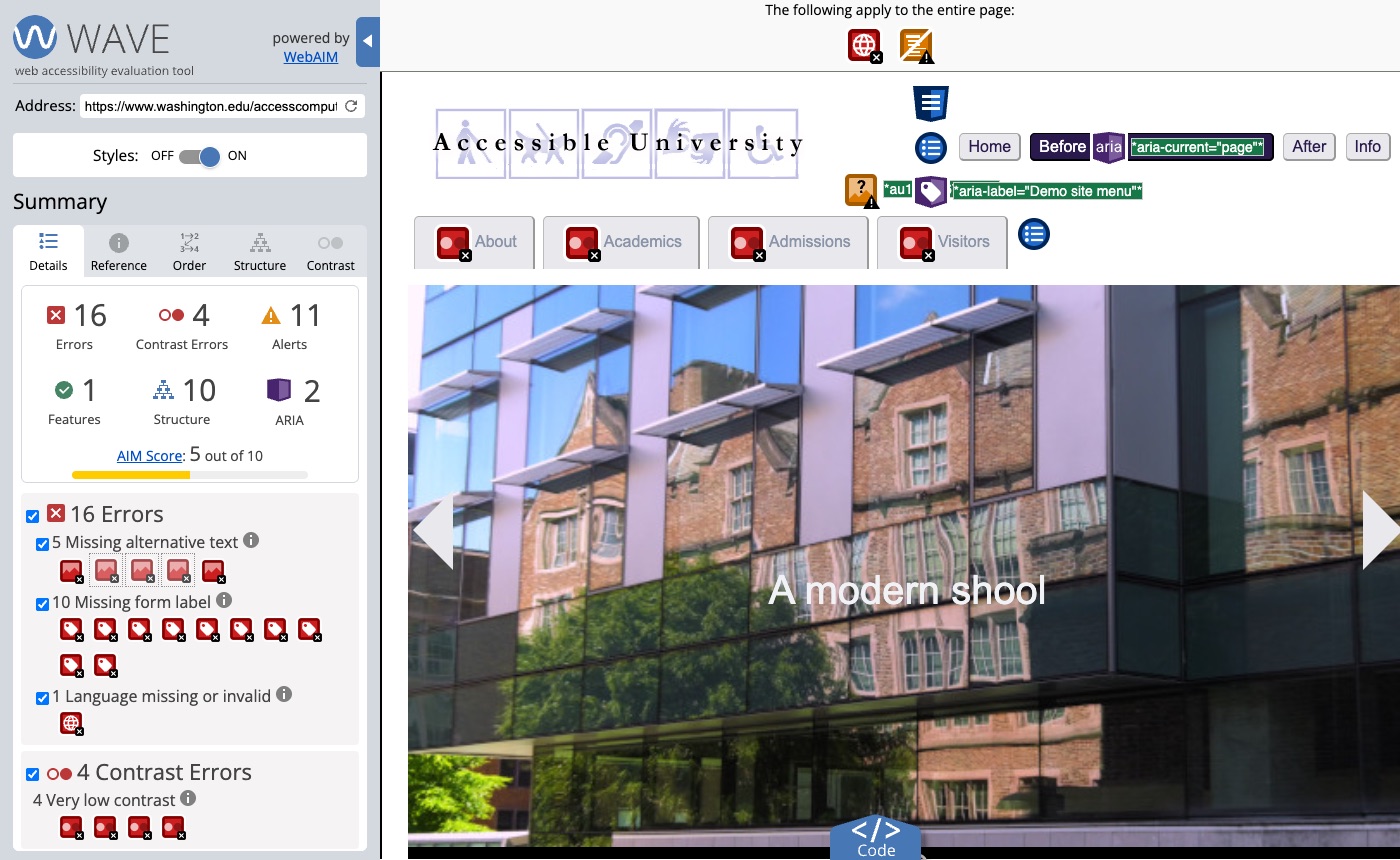
- Run a free scan. Paste your address into WAVE, the free checker made by WebAIM. Red icons are errors. Start with contrast, alt text and form labels.
- Listen to it. On a Mac, press Cmd + F5 to turn on VoiceOver. On Windows, press Ctrl + Windows key + Enter to start Narrator. Close your eyes and try to send yourself a message through your own contact form. Fifteen seconds of this tells you more than any report.
Do not assume your own site is fine. I scanned mine this month and found a fault on my contact page that nobody had noticed.
If the site passes all four, you are ahead of most of the web. For the full five-test version, with contrast and phone checks, see how to test website accessibility in 15 minutes. If it fails one, you now know exactly where to start, which is more than most owners know when the letter arrives.
How to make your website ADA compliant
Here is how the work usually goes on a small business site, in three steps.
- Fix the template. Colours, the menu, buttons, icon links, the page language and the focus outline. These are set once and repeat on every page.
- Fix the forms. A visible label on every field, error messages that say what went wrong and how to fix it and a send button you can reach with the keyboard.
- Fix the content. A short description on every meaningful photo, headings in the right order, link text that makes sense on its own (“See the menu” in place of “Click here”) and captions on any video.
Then keep it fixed. A new photo with no description, or a new form plugin, can undo the work in an afternoon. A quick check after every change keeps you where you are.
There is a bonus most owners do not expect. Nearly every one of these fixes also helps everyone else. Readable contrast helps someone on a phone in bright sun. Clear labels make your contact form quicker for every visitor. Image descriptions and proper headings help Google understand your pages. An accessible site is simply an easier site to use, and easier sites get more calls. Accessibility is one of the ten checks that make a good website.
The one thing to remember. No widget, badge or certificate makes a website ADA compliant. What protects you, and what wins the customer, is a site a person can actually use with a keyboard, a screen reader or a zoomed-in screen.
Where the numbers come from
10 outside sources · 1 from my own work
- 3,1172,45227%
The 3,117 and 2,452 federal website accessibility lawsuit counts for 2025 and 2024 are from Seyfarth Shaw's ADA Title III blog: the 25 March 2026 article (3,117 in 2025, up 27%) and the 22 April 2025 article (2,452 in 2024).
Outside source - Method
They count federal website accessibility lawsuits only, not all ADA Title III filings.
Outside source - Method
The Department of Justice quotations are from its Guidance on Web Accessibility and the ADA, dated 18 March 2022, read on 23 November 2026.
Outside source - Method
The Title II dates are from the April 2026 interim final rule as summarised by the SBA Office of Advocacy.
Outside source - Method
The FTC order against accessiBe is from the FTC press release of April 2025.
Outside source - 95.9%
The 95.9% figure and the six failure percentages are from the WebAIM Million, February 2026 data, page updated 30 March 2026.
Outside source - Method
The 1 in 4 figure is from the CDC's Disability Impacts All of Us infographic.
Outside source - Method
The bakery is an illustration.
Outside source - Method
The four tests and the three-step fix order are my own working method.
My own work - Method
The audit and fix cost ranges in the questions are from published pricing pages and guides by accessibility firms (Accessible.org, WebAuditSolutions, Accessibility.build and remediation guides), read on 23 November 2026; most are vendors with a stake in the answer.
Outside source - Method
This page is not legal advice.
Outside source
If you would like a second pair of eyes
Run the four tests first. They are free and they are yours to keep, whether or not you ever talk to me.
If you find problems and would rather not fix them yourself, that is what I do at 99creatix. I audit existing sites against WCAG 2.2 Level AA by hand as well as with software, then fix what I find. If you searched for ADA compliant web design, this is what it means in practice: every site I build is checked against the same standard before launch, and my website care plans include a monthly accessibility re-check. You can see my starting prices.
The easiest first step is free. Run the accessibility checker. If it finds problems, send me the report and I will tell you which to fix first. I reply within one working day.