
Most answers to this question go straight to conversion tips: a bigger button, a shorter form, a popup. They skip the question that decides everything else, which is whether the visitors were ever going to become leads. The wrong traffic and a broken path look identical on an analytics graph, and they have opposite fixes.
The short version. Check the traffic before the website. Look at which searches bring people in, which pages they land on and where they come from, because if those are wrong no page change will help. If the traffic is right, walk the path a buyer takes: the first screen, the offer, the contact route and the form. Then test the tracking, because sometimes the leads are arriving and nobody is counting them.
- Traffic without leads is one of three problems, the wrong traffic, a broken path or broken tracking, and all three look identical on an analytics graph.
- Check the traffic first in Search Console: which queries, which landing pages and which countries are sending the visitors.
- If the traffic is right, walk the path on a phone: first screen, offer, contact route, form, and what happens after someone submits.
- Test the tracking in ten minutes, because enquiries sometimes land in an inbox nobody reads or go uncounted in analytics.
- A site with a few hundred visits a month cannot tell a broken path from a quiet month, so fix the traffic before redesigning.
Three problems that look the same
Traffic without leads is one of three problems. The people arriving were never buyers. Or buyers are arriving and something between the landing page and the enquiry stops them. Or the enquiries are coming in and the report does not show them.
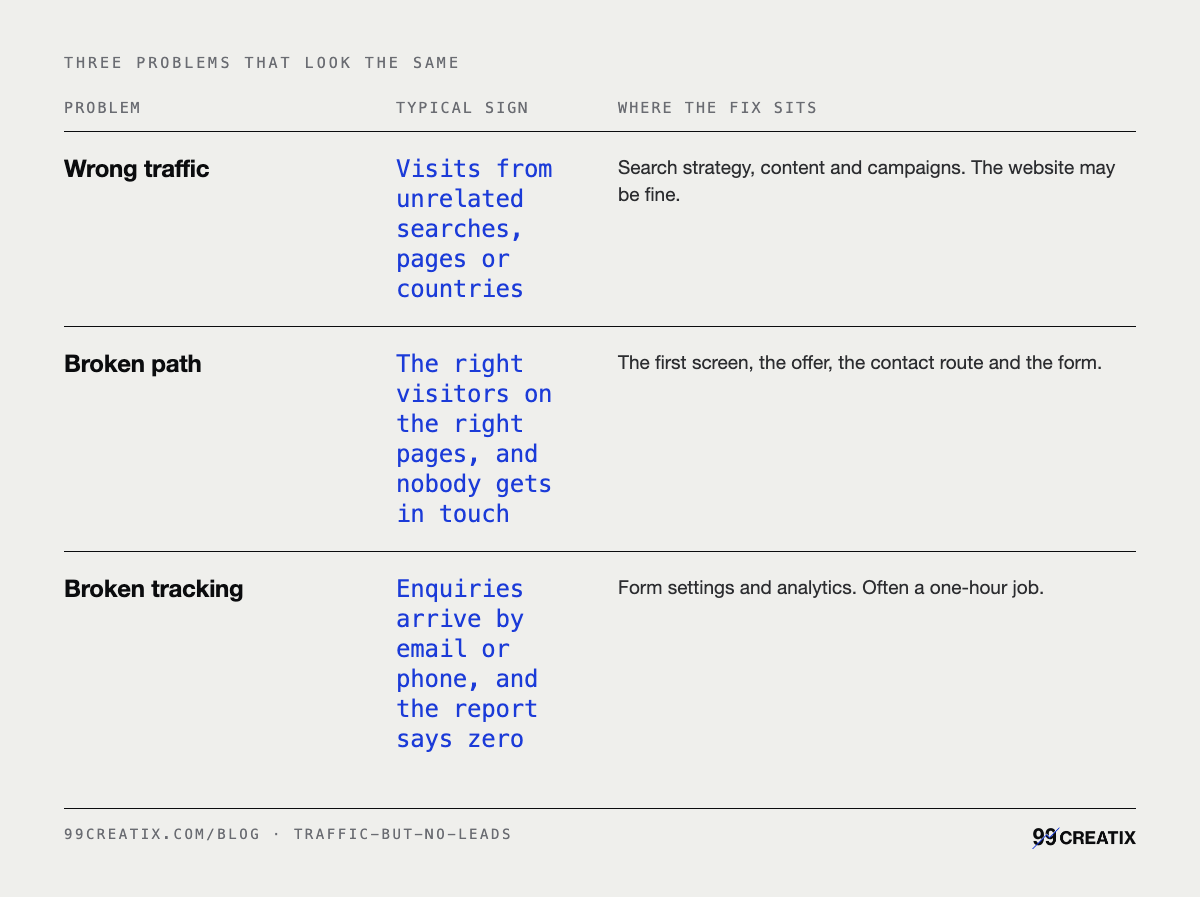
Check them in that order. Fixing the path for traffic that was never going to buy is how a business spends a quarter redesigning a page that was working.
Step 1: check who is arriving
Three questions, all answerable in free tools you probably already have.
- Which searches bring people in? In Google Search Console, the Performance report lists the queries that produced clicks, with impressions, click-through rate and average position. Read the top 20 queries by clicks. If most are "what is" and "how to" questions and you sell a service, the traffic is readers, not buyers.
- Which pages do they land on? Switch the same report to pages. One blog post ranking for something loosely related can carry most of a site's traffic and none of its leads. That is not a failure of the post, but it is not marketing working either.
- Where are they from? Your analytics shows sources and countries. Visits from a country you do not serve, a referral spike from a site you have never heard of, or a paid campaign aimed at a broad audience all add sessions that cannot become leads.
If the problem sits here, the fix is to aim content and campaigns at the searches buyers make, which is the method in write for the question, not the keyword. The website can wait.
Step 2: walk the path a buyer takes
If the searches and landing pages are right, open your top landing page on a phone and go through it as a buyer would. Five points, in order.
- The first screen. Does it say what you do, for whom and where, before any scrolling? A visitor who cannot tell leaves, and first impressions on a website covers what that screen has to do.
- The offer. Is there one clear thing to ask for: a quote, a call, a consultation? A page offering five next steps tends to get none. Say one clear thing is the longer version of this point.
- The contact route. Can a buyer see how to get in touch from every page, on a phone, without opening a menu? A phone number that is not tappable, or a contact page two clicks deep, loses enquiries nobody sees being lost.
- The form. Count the fields and ask whether you use each one. Then submit it on a phone and note anything that fails: a required field that is not marked, a captcha that will not load, an error that clears everything typed.
- What happens next. Does the page say what happens after someone submits, and how quickly you reply? An enquiry is a small risk for a buyer, and a stated reply time makes it smaller.
Step 3: the leads may already exist
Before redesigning anything, confirm the leads are missing. We find sites where enquiries arrive and the report shows zero, and sites where enquiries go somewhere nobody looks. This is the last step in the order, but the quickest, so if you only have ten minutes, start here.
- Notifications to the wrong inbox. Form emails going to an old address, a former employee or a spam folder.
- A form that stopped sending. A plugin or theme update broke it, and the visitor saw no error.
- A thank-you page lost in a redesign. The event that counted leads fired on that page, so it never fires now.
- An event never marked as a key event. Google Analytics renamed conversions to key events, marked on the Key events page in Admin. Setup guides written before the rename use the old name.
- Calls and emails nobody counts. Taps on a phone number or an email link are enquiries, and many setups do not record them at all.
The test takes ten minutes. Submit every form on the site from a phone, using a name you will recognise. Tap the phone number and the email address. Then check the inbox, the CRM if you have one, and the analytics the next day. Anything missing from any of the three is the first fix.
When it is none of the three
Two honest limits. If a site gets a few hundred visits a month, the numbers are too small to tell a broken path from a quiet month. Redesigning on the strength of them is guessing, and the better spend is on getting the right traffic first.
And some websites produce leads without getting the credit. A buyer reads three pages, closes the tab, and phones a week later after asking a colleague. If your leads arrive by phone and referral, ask each one how they found you before concluding the site produces nothing.
The Search Console Performance report's metrics and groupings are described from Google's own help documentation, checked 15 September 2026. So is Google Analytics' renaming of conversions to key events, which are marked on the Key events page in Admin. The $4,900 build for up to eight pages and its $500 technical SEO foundation line are our published prices, listed on the pricing page. The three-problem split, the order of checks, the five path points, the tracking failures we find on client sites and the few-hundred-visits threshold are our editorial judgement from auditing small business sites, not survey data. No third-party statistics are cited.
What it costs to fix
Most of this costs an afternoon. The tracking test is free, and the traffic checks need only Search Console and the analytics you already run. If the traffic is the problem, that is the job our SEO service is scoped for, and the pricing page lists what it costs.
If the path is broken on every page, because the site does not say what the business does or does not work on a phone, it is a rebuild rather than a set of tweaks. Our custom builds start at $4,900 for up to eight pages. That includes analytics and lead tracking, and a $500 technical SEO foundation, the work explained in technical SEO in plain words. More than eight pages, a booking system or CRM integration, or migrating a large existing site moves the price. How urgently you need it does not.
The order is the whole method: who is arriving, then the path they take, then whether the enquiries are being counted.
Skip the first step and you risk rebuilding a page for visitors who were never going to buy.