
Most advice for a Shopify store with visitors and no orders is a list of tactics in no particular order: install a reviews app, run a discount, redo the homepage, fix your SEO. What a Shopify website costs covers the build; this piece covers the store that exists and does not sell. Any of them might help. None starts by asking which problem you have, so owners spend months fixing a step that was never broken.
The short version. Check the traffic is real first, because bots, the wrong country or the wrong ads can fill a sessions graph with people who were never going to buy. If it is real, Shopify's Conversion rate breakdown report shows the step where visitors stop. A drop before the cart points at the product page, the price or shipping. A drop after it points at checkout, and a store where real visitors browse and never add anything often has a trust problem.
- Check the traffic is real before touching the store: filter bots with Human or bot session, then read Sessions by location and Sessions by referrer.
- Shopify's Conversion rate breakdown report shows the step where visitors stop, and that step decides which fix to make.
- A drop before the cart is usually the product page, the price or shipping, not the checkout.
- Checkout drops have specific and mostly free fixes, while real visitors who browse and add nothing usually need trust signals.
- If the traffic, product page, price and checkout all hold up, the problem may be demand, and a rebuild would be the wrong spend.
Step 1: check the traffic is real
A sessions count is not a count of shoppers. Three things inflate it, and Shopify's own reports show each one.
- Bots. Shopify classifies each session as human or bot, and you can apply the Human or bot session filter to sessions reports. It is not applied by default, and it only covers data from 7 October 2025 onwards. Apply it before reading anything else.
- The wrong markets. The Sessions by location report shows the countries visitors come from. If a large share come from places you do not ship to, they cannot buy, whatever the product page says.
- The wrong sources. Sessions by referrer shows whether visitors arrive direct, from search or from another site. A spike from one referrer, or a paid campaign aimed at a broad audience, fills the graph with browsers. Sessions by landing page shows where they arrive, and a giveaway page is not a product page.
If the traffic is the problem, the fix is in the campaigns and the content, not the store. The same split between the wrong traffic and a broken path applies to any website, and traffic but no leads is the general version of this triage.
Step 2: find the step where they stop
The Conversion rate breakdown report follows visitors through four stages: all sessions, sessions with cart additions, sessions that reached checkout, and sessions that completed checkout. Filter out bots, choose the last 30 days, and write down the share lost between each pair of stages.
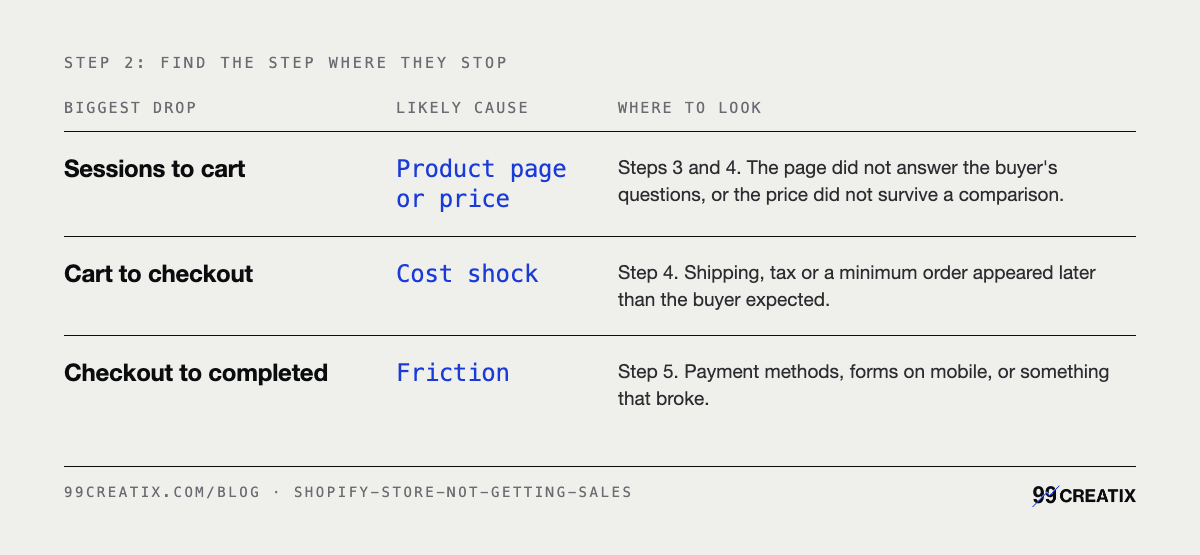
If only a handful of carts appear in a month, the percentages are too small to mean anything. Treat the rest of this piece as a checklist rather than a diagnosis, and start by buying something from the store yourself.
Step 3: the product page
In the stores we audit, the largest drop usually sits here, before anyone touches the cart. Read your best-selling product page on a phone, as a stranger. Can you tell the size, the material, when it arrives and how returns work without hunting? A shopper who has to guess any of those leaves, and how people actually decide covers what they are weighing while they do.
Photography carries more of the sale than copy on most product pages. Show the product in use, at a scale a buyer can judge, and from the angles they would check in a shop.
Three more reports help here. Sessions by device shows how many visitors are on phones, which tells you which screen to judge the page on. The Largest Contentful Paint report shows how long the main content takes to appear, by page. And Searches with no results lists what visitors typed into your store search and could not find, which is a list of products or words your catalogue is missing.
Step 4: price and shipping
A visitor who adds to cart and leaves before checkout usually met a number they did not expect. Shipping is the common one. Put the cost, or the free-shipping threshold, on the product page, so nobody meets it for the first time at the end.
Then the uncomfortable check. Search for your product the way a buyer would and look at what else comes up. If the same or a similar item is cheaper, with faster delivery, your product page has to explain the difference. If it does not, the visitor was comparing prices and you lost. No app fixes that. It is a positioning question.
Step 5: checkout, briefly
If the drop is between reaching checkout and completing it, the causes are specific and mostly settings: forced account creation, missing payment methods for the market, too many form fields, apps and popups that interfere. They are set out in order in why a Shopify store loses orders at checkout, so they are not repeated here. Start with the first item on that list: buy something from your own store, on your own phone, with a real card.
Step 6: trust
Real visitors who browse several pages and add nothing are often stuck on the question every first-time buyer asks. Is this a real business, and will it send me the thing? Five checks answer it.
- Returns. A returns policy a buyer can reach from the product page, written in plain words.
- Contact. A route beyond a form: an email address, and a response time you keep.
- Reviews that look real. A page of identical five-star reviews reads as bought. The occasional four-star review with a reply reads as a business.
- A proper domain. The store on your own domain, not the myshopify.com address, with email from the same domain.
- A named business. An about page that says who runs the store and where orders ship from.
Trust badges and security seals come last. They cannot stand in for any of the five.
Every Shopify report and filter name is from Shopify's Help Center, checked 15 September 2026. They are Human or bot session, Conversion rate breakdown and its four stages, Largest Contentful Paint, Searches with no results, and Sessions by location, referrer, landing page and device. The 7 October 2025 start of Shopify's bot classification is from the same source. The $5,900 store build and its $3,400, $1,100, $700 and $700 lines are our published prices, listed on the e-commerce service page and the pricing page. The six-step order, the observation that the largest drop usually sits before the cart in stores we audit, the trust checklist and the demand limit are our editorial judgement, not survey data. No third-party statistics are cited.
When the store is not the problem
An honest limit. If the traffic is real, the product page is clear, the price holds up and the checkout works, the remaining explanation may be demand. Not enough people want this product at this price. No store change fixes that, and a rebuild would be the wrong money to spend.
If the diagnosis does point at the store itself, meaning a theme that is slow on phones or product pages lifted from a demo, our Shopify builds start at $5,900. That floor covers the build at $3,400, product page conversion at $1,100, a checkout audit at $700, and payments, shipping and tax setup at $700. A large catalogue or integrations with stock or accounting systems move it, and migrating an existing store is scoped separately. Shopify's own subscription is paid directly, at cost. Every line is on the pricing page.
Before any of that, run steps 1 and 2. They take twenty minutes, and they decide whether you need anyone at all.